
Downloads page
If you are unsure if you have an Intel Mac or a Silicon Mac:
Click the Apple logo at the top left of your screen and then click “About this Mac”
That will display details about your Mac
If the details about the chip / processor says Intel, then you have an Intel based Mac
If the details about the chip / processor says M1, M2, M3 or M4 for example or silicon, then you have a Silicon based Mac
Available for macOS.
Windows and Linux versions are planned
Install the app and start securing your files in minutes
Once downloaded, open Terminal on your Mac and run one of these commands depending on which file you downloaded:
shasum -a 256 ~/Downloads/EncryptDecrypt-1.0.1-mac-Apple-Silicon.dmg
OR
shasum -a 256 ~/Downloads/EncryptDecrypt-1.0.1-mac-Intel.dmg
To confirm the download completed correctly, the output from Terminal should be one of these:
Apple Silicon:
b7713fc14a68b2cf3d1f3f7d42220cd69582c86e9ea25826a70bc81d3efb12f2
Intel:
914a98c6a452200c97ddc9602bbfb445127cfc4ff255175fd0945a52a45bdf7d
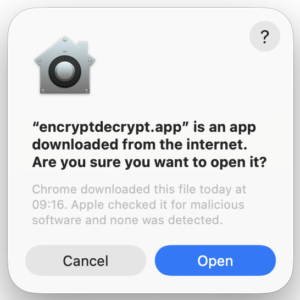
When opening the new app for the first time, expect Apple to show a warning that this app is downloaded from the internet. This is normal. This is your Mac being protective. It has passed the Apple gatekeeper checks about solid apps that Apple has checked and verified. All of our apps have Apple certificates and go through a strict vetting process by Apple themselves.
Version update notes
EncryptDecrypt Latest Version Notes
Version 1.0.1 (Released: 06 May 2026)
– Update notifications now stand out more clearly in red.
– Update notifications now include a clickable download link.
– The password requirement text now reads “24 – 256 characters” for easier scanning.
– When a secure password is generated, EncryptDecrypt now reminds the user to copy and save it securely before encrypting.
– EncryptDecrypt now adds best-effort protection against normal window capture while password fields are shown in plaintext.
– Screenshots and screen capture are allowed again when password fields are hidden.
Important note:
– Screen capture protection helps reduce accidental exposure while a password is visible.